Mupen64Plus for RISC OS
This is a RISC OS port of Mupen64Plus, the open-source Nintendo 64 emulator,
for the Raspberry Pi. It runs N64 games in a window on the desktop or full screen, with sound and save states.
I did the port with the help of Claude AI.
It draws with OpenGL through RISC3D, Andy Youll's 3D driver for
RISC OS. On a Raspberry Pi 4 that means the Pi's GPU, which runs games at well over the N64's full speed.
It also runs in the RoMac emulator, on the Mac's GPU.
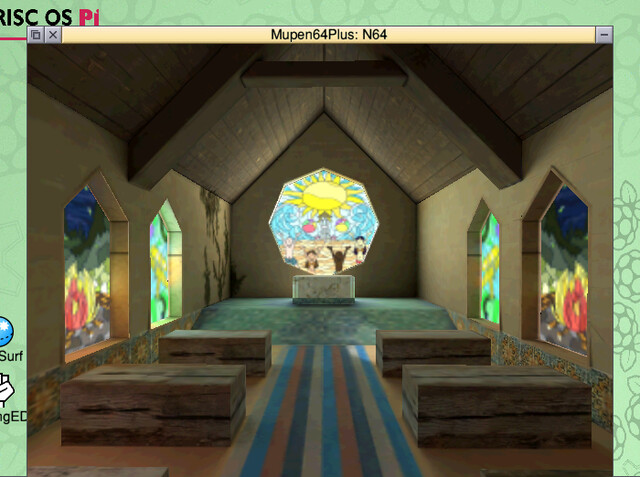
James Lambert's
megatextures demo
(N64brew Game Jam 2023) on a Raspberry Pi 4, drawn by its GPU through RISC3D.
It has:
- Mupen64Plus 2.6's core with its dynamic recompiler for the Pi's ARM processor, the Rice video plugin,
and high-level emulation of the N64's signal processor
- a window on the desktop, or full screen with Alt+Enter
- an icon on the icon bar: drop a ROM on it to play (a .z64, .v64 or .n64 file, or a zip holding one)
- save states, pause and full screen from the icon's menu, and a Choices window for the window size,
the emulation and sound
- sound, through SharedSoundBuffer and StreamManager
- the keyboard as the controller (no joystick yet)
No games are included. Use dumps of cartridges you own, or homebrew that its authors let you download,
such as the megatextures demo above.
If you find a bug, please let me know through the contact form or by raising an issue on
GitHub.
Installing with PackMan
The best way to install it is with PackMan, RISC OS's package manager, as it will then
tell you about new versions and install them for you, keeping your settings and saves.
- Open PackMan's Choices and go to Sources.
- Add this source: https://davidsharp.com/riscos/pkg
- Also add Andy Youll's source, which has RISC3D, his 3D driver:
https://adyoull.github.io/riscos-packages/pkg/index
- Update PackMan's lists, then install Mupen64Plus from the Emulation section.
PackMan puts it in Apps.Emulation, and installs the modules it needs.
PackMan won't install over files it didn't put there itself, so if you already have !Mupen64Plus from a zip,
move it out of Apps.Emulation first. Your settings and saves are kept in Choices, not in the application.
Or download it:
Download  8.3 Mb Zip Archive, version 0.2.0
Also on the GitHub releases page.
Requirements
- A Raspberry Pi 2, 3 or 4 with RISC OS 5 (tested on 5.30). A Pi 4 is best. RISC OS on Linux and RoMac work too.
- RISC3D in !Boot.Resources: 0.22 or later on a Pi 4. PackMan installs it from Andy Youll's source (above). To do it by hand,
copy !RISC3D from its releases page into
!Boot.Resources and restart. The OpenGL libraries are built in, so !MesaLibs isn't needed.
- SharedUnixLibrary 1.16 or later and ARMEABISupport 1.03 or later in !System.
They come with RISC OS 5, and PackMan installs them if they're missing.
- A 16 million colour desktop mode. In a 64 thousand colour mode the picture comes out garbled for now:
that's in the OpenGL library's window code, and a fix is on its way.
- For sound, SharedSoundBuffer and StreamManager. Without them it runs silently.
- About 200 MB of free memory.
On a Pi 4 with RISC3D, Super Mario 64 runs at about 165 frames a second with the speed limiter off,
against the N64's 60, so games run at full speed with room to spare.
Playing
Drop a ROM on the icon bar icon and the game opens in a window. Click the window to give it the input focus.
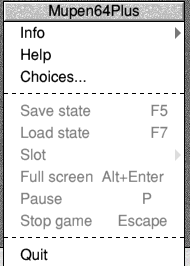
Clicking the icon again offers the last game. The icon's menu has the game's commands while it runs.
The icon bar menu.
| Arrow keys | analogue stick | Return | Start |
| Left Shift | A | Left Ctrl | B |
| Z | Z trigger | X / C | L / R |
| W A S D | D-pad | I J K L | C buttons |
| F5 / F7 | save / load state | 0-9 | state slot |
| P | pause | Escape | stop |
| Alt+Enter | full screen | Insert | screenshot |
!Help has the rest, including where the settings, saves and log files are.
Source code and bug reports
The port is free software under the GPL (version 2), and the full source code is on GitHub:
Mupen64Plus for RISC OS.
If something doesn't work, please raise an issue
or use the contact form. !Help says which log files to send.
Thanks must go to the Mupen64Plus team, to Andy Youll for RISC3D and riscos-mesa,
and to the GCCSDK project for UnixLib and SDL.
Nintendo 64 is a trademark of Nintendo. This port is an unofficial, non-commercial hobby project. It is not made,
affiliated with, endorsed or supported by Nintendo or the Mupen64Plus team, so please don't contact them about any
problems with it. No games or other copyrighted material are distributed here: only the emulator's program code,
which is under the GPL. The megatextures demo is James Lambert's, under the MIT licence.
RISC OS, Raspberry Pi and any other trademarks mentioned belong to their respective owners.