Doom 3 for RISC OS
This is a RISC OS port of dhewm3, the open-source engine
of id Software's Doom 3 (2004). id released the engine's source under the GPL in 2011, and the dhewm3
project has kept it up to date since. The port is by me, with the help of Claude AI.
On a Raspberry Pi 4 with RISC3D, Andy Youll's 3D driver
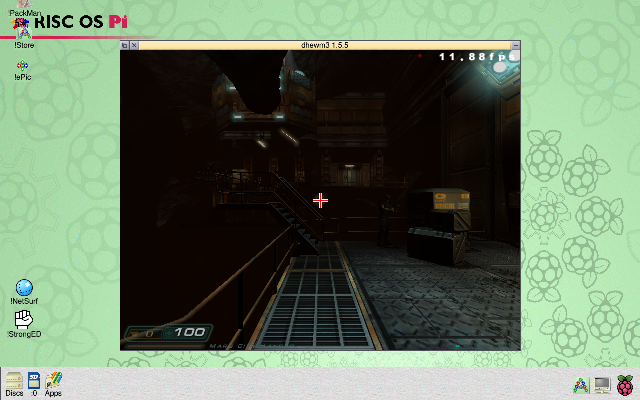
for RISC OS, the game is drawn by the Pi's GPU. It runs in an 800 x 600 window on the desktop, or full
screen. On a Pi 4 it runs at about 10 to 15 frames a second in Mars City with shadows on. Shadows are
off at first on a Pi 4, which makes it about half as fast again; a tick in the icon bar menu turns
them on, even in the middle of a game.
It plays the free demo and, from version 0.2.2, the full game, if you have your own copy of Doom 3
(see getting the game data below).
The Mars City hangar on a Raspberry Pi 4, drawn by its GPU through RISC3D.
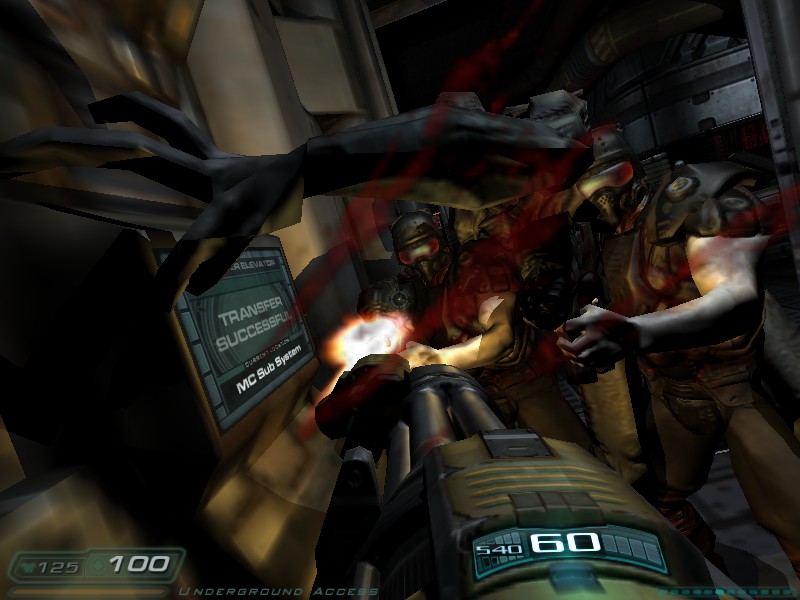
An imp attacks in Mars City Underground (Raspberry Pi 4, shadows on).
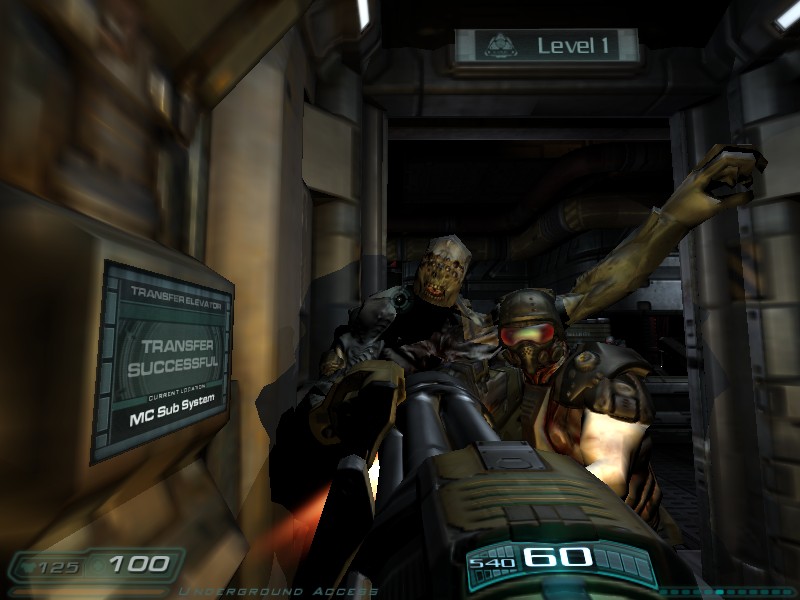
A zombie and a Z-Sec soldier, lit by a muzzle flash.
It has:
- the game as id made it, with its single-player campaign and sound
- an icon on the icon bar, with a menu for Info, Help, Shadows and Quit
- saved games and settings kept in the app's own folder, so an update leaves them alone
The game data isn't included. Without any, the app offers to download id's free Doom 3 demo. If you have
the full game from Steam or GOG, copy its files across (see below).
The full game on a Raspberry Pi 4
The full game needs much more of the GPU's memory than the demo. Before it starts on a Pi, the app gives
the GPU a 1 GB area for its buffers (RISC3D gives programs 256 MB unless told otherwise) and plays with
smaller textures, so it needs about 700 MB of free memory: a Pi 4 with 2 GB or more. It does this itself;
!Help explains the details. Loading a level takes about a minute and a half.
Installing with PackMan
The best way to install it is with PackMan, RISC OS's package manager, as it will then tell you about
new versions and install them for you, keeping your game data and settings.
- Open PackMan's Choices and go to Sources.
- Add this source: https://davidsharp.com/riscos/pkg
- Also add Andy Youll's source, which has RISC3D, his 3D driver:
https://adyoull.github.io/riscos-packages/pkg/index
- Update PackMan's lists, then install dhewm3 from the Games section.
PackMan puts it in Apps.Games, and installs the modules it needs.
Or download it:
Download 10.6 MB zip archive, version 0.2.3 (the file keeps its RISC OS file types).
Also on the GitHub releases page.
Requirements
- A Raspberry Pi 4 with RISC OS 5 (tested on 5.30, on a 4 GB Pi 4). For the full game,
a Pi 4 with 2 GB or more.
- RISC3D 0.22 or later, for the GPU. PackMan installs it from Andy Youll's source (above). To do it by hand,
copy !RISC3D from his releases page into
!Boot.Resources and restart.
- SharedUnixLibrary 1.16 or later and ARMEABISupport 1.03 or later. PackMan installs them if they're missing.
- About 1 GB of free disc space while the demo is downloaded and installed, and about 1.6 GB for the full game's files.
Getting the game data
The first time you click the icon, if there's no game data, the app offers to download id's free demo.
It downloads id's own installer, checks it, and shows you id's licence. The demo is installed only if you
accept the licence. You can also drag a copy of the installer onto the icon.
For the full game, buy Doom 3 from Steam or GOG: the original DOOM 3, not DOOM 3: BFG Edition, whose
data the engine can't read. Install it on a PC or Mac, then copy its base folder (on Steam,
steamapps/common/Doom 3/base) into the app's folder as !dhewm3.base. Only the pk4 files, pak000 to
pak008 (about 1.6 GB), are needed; leave out the other folders. A click on the icon then plays the full game.
If you find a bug, please let me know through the contact form or by raising an issue on
GitHub.
dhewm3 and its RISC OS port are free software under the GNU General Public License version 3, with id's
additional terms. The licence is in the app as COPYING, and the source is at
github.com/davidpsharp/riscos-dhewm3.
Doom and Doom 3 are trademarks or registered trademarks of id Software LLC, a ZeniMax Media company.
This port is an unofficial, non-commercial hobby project. It is not made, affiliated with, endorsed or supported by
id Software or the dhewm3 team, so please don't contact them about any problems with it.
Only the program code, which is under the GPL, is distributed here. The game data isn't included and remains
the property of id Software; the free demo is downloaded from id's own installer, under id's licence.
RISC OS, Raspberry Pi and any other trademarks mentioned belong to their respective owners.